Parametric Finite Element Model of Sport Utility Vehicle
 Help for the interactive VRML Model viewerThis page provides infromation about the usage of the VRML viewer and the interactive model panel. Models using this technology can be found on the "View Models" Page. 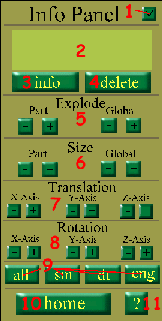


Info Panel Help2. Part Info; Displays the information about the selected part, such as title and/or location 3. Info Button; Brings up an HTML document with detailed information about the selected part 4. Delete Button; Removes the selected part from the model. To view the deleted part again, the whole model must be reloaded. 5. Explode Function; Will move either the selected part or all parts away or closer to the center of the model. 6. Size Function; Will resize either the selected part or all parts. 7. Translation Function; Will move the selected part along the x, y or z axis. 8. Rotation Function; Will rotate the selected part along the x, y or z axis. Part will automatically return to it's original position when a new rotation is started. 9. Navigation Buttons; all-loads the full model; sm-loads only sheet metal parts; dt-loads only drivetrain; eng-loads only engine. 10. Home Button; Returns the viewer to the home page. 11. Help Button; This document. CosmoPlayer Help13. Select Viewpoint; Allows selection of various views around and inside the model. 14. Seek; Allows user to focus on the selected area of the model. 15. Control Switch; Allows for a new set of controls. 16. Zoom Button; Zooms the camera. 17. Rotate Button; Rotates the model. 18. Pan Button; Pans the camera. 19. Preferences; Allows change of many of CosmoPlayer's settings. 20. Help; CosmoPlayer help. 21. Tilt; Rotates the camera. 22. Gravity on/off; If on, requires user to stay on the ground in a virtual world. 23. Walk; Moves camera forward. 24. Slide Button; Slides the camera in the plane orthogonal to the viewer. 25. Undo/Redo; Deletes the last move made by the user. 26. Straighten; Will make the camera parallel with the xz plane. |